 BUY
How to Use the DataColor Spyder Checkr Photo
The Datacolor Spyder Checkr Photo is a pocket-sized colour chart that can help you get consistently accurate colours in your photos and videos. To use it, take a photo (or video) of it in your scene before you start shooting, then use that image to apply the correction in post-production and editing. It is great for all cameras, it’s easy to use, and perfect for both beginners and pros. Follow the instructions below.
How to Use the Datacolor Spyder Checkr Photo
There are a variety of ways to use the colour correction features of the Datacolor Spyder Checkr Photo.
- Apply corrections to White Balance in post-production
- Apply corrections to White Balance in-camera while shooting
- Place the Datacolor Spyder Checkr Photo into your scene and use your camera’s custom white balance setting to choose
- Create colour profiles specific to your camera and lens combination to apply in post-production
- Use as a tool to set the correct exposure in-camera
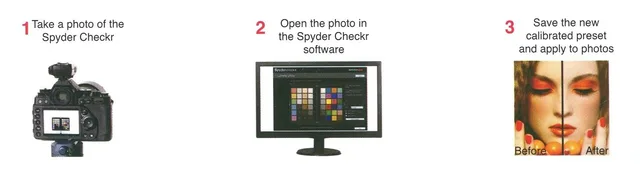
To use the Spyder Checkr Photo, capture a RAW image of the colour target in the same lighting and setup as your shoot.
- In Adobe Lightroom/Adobe Camera RAW/ Hassleblad Phocus, adjust white balance and exposure using the grey patches.
- Export as TIFF and load into Datacolor’s Spyder Checkr software, which aligns swatches and analyses differences from known colour values
- Export presets (HSL adjustments) in modes like Colorimetric, Saturation, or Portrait for consistent correction across all your shots.
What’s included in the kit?
- Spyder Checkr 48 Target Color Cards and Gray Cards
- Spyder Checkr Case
- Download link and Software Serial Number